Next: 5. Test Cases Up: Fast Transformation-Based Learning Toolkit Previous:
3. System Description Contents
Subsections
4.
Using The Toolkit
The first step in using the fnTBL toolkit is to create the training and test
files. Even though there are some tools provided with the toolkit that help with
the file creation, most preprocessing is left to the user. No tokenization or
end-of-sentence detection is performed (even if this may change, as it easy to
train a TBL system to perform EOS detection).
Once the corpus is in the required format (one word per line), the tools
provided can augment it with the most likely tag given some features (for
instance, given the word), and can construct the constraint files. In the POS
tagging case, an almost complete solution to creating the initial files is
provided (see the POS test case).
In this initial release, the probability model does not work properly, and it
should not be used. This problem will be fixed in the next release.
4.2
Training using fnTBL
Once the training file is in place, the rule file can be generated. This is
the most time-intensive step of the process, as the main search is performed
during training. To train from a corpus, the user should use the command:
fnTBL-train <train_file> <rule_output_file> [-F <param_file>] [-threshold <stop_thr>] [-pv] [-t <tree_prob_file>] [other
options]
where:
- <train_file> represents the training file;
- <rule_output_file> is the file where the rules will be
output;
- <param_file> is the file describing the main system
parameters (see 3.1);
- <stop_thr> sets the stopping threshold - the algorithm stops
when a rule with this score is reached - the default is 2;
- -p - turns on the probabilistic classification (the tree generation, as
described in [FHN00]);
- -v - turns on some verbose output;
- -V <verbosity_level> - defines the verbosity level (5=max) -
use with caution
 ;
;
- <tree_prob_file> - defines the file in which the probability
tree is output into (again, see [FHN00]).
The other options are:
While the program is running, it will output the
rules that are selected as it progresses, along with the time it took to compute
the current rule. At the end, the total running time is also printed. If you
don't want this output, you can redirect the stderr to /dev/null, by using a
command like
if you're using tcsh or
if you're using bash/ksh etc.
Also, the <param_file> parameter can be specified as the value
of the shell variable DDINF. So, if you don't want to specify it as a command
line parameter, you can set the shell variable to point to the appropriate file,
and it will be used just the same.
4.3 Classification using fnTBL
Once the rule file is generated, or if you have the file from other sources,
and the test file is in the appropriate format, fnTBL program can be used to
apply the rules, by using the command:
fnTBL <test_file> <rule_file> [-o
<out_file>] [-F <param_file>] [-printRuleTrace]
where:
- <test_file> is the file containing the test data, in the
column format;
- <rule_file> is the rule file generated using
fnTBL-train;
- <out_file> is the optional file where the result will be
output (default is standard out);
- <param_file> defines the file containing the parameters (also
can be specified using the shell variable DDINF);
- -printRuleTrace - after each example is printed the sequence of indices
corresponding to the rules that applied on the sample - used for
debugging/inspecting purposes.
Important observation: the
initial set-up of the test data should be equivalent to the initial set-up of
the training data (i.e. using the same most-likely distribution), or the program
will not behave properly, as it is to be expected.
A scoring program is also provided, as described in Section A.2.
One possible warning that can be output by the program has the following
form:
This message warns the user that after applying a rule, its counts are
not 0. Normally, after applying a rule to the corpus, the rule does not apply
anymore, therefore its good and bad counts should be 0. However, there are cases
where this is not true: consider the case of a ``recursive'' rule4.1 such as the above mentioned one. After
applying the rule in the following context:
(on line 3), the rule is applicable again on line 2, while it was not
before the application. If the rule is not recursive, then you probably found a
bug in the fnTBL code.
A definite error message may appear:
This message appears if the last rule has been selected 5 times in a row
- it usually happens if there is a bug in the updating score of the system.
Since the algorithm needs to keep track of the exact counts for each rule at
every step of the algorithm, any mistake in count-keeping will result in this
error, sooner or later. If you manage to obtain this message, please contact the
authors and submit a bug report - see Section 4.8
for details.
As mentioned in Section 2.1,
the algorithm will select the rules in the decreasing order of their score. At
some point, however, will have to choose between rules that have identical
scores. One option would be for it to choose randomly; this is a
not-too-desirable behavior, since the results are no longer entirely replicable.
Therefore, we made this decision making completely deterministic, as follows:
given 2 rules  and
and  we decide to choose over if and only if the
following condition holds:
we decide to choose over if and only if the
following condition holds:
 or
or
 and
and
- has more tokens than
(more atomic
predicates) or
- and have the same number
of atomic predicates and
- the template of was declared before
the template of or
- and have the same
template and the target of has a
lower index in the vocabulary as the target of .
The procedure is rather complicated, but the
choices are based on the experience the authors had in developing the toolkit.
Choice 2a
may seem a little strange, since is the opposite of Occam's razor, we think it
is better to make finer decisions than more general ones, as the finer ones will
result in errors less often at the expense of the rule not applying that often -
basically, we prefer precision to recall.
To leave more room for experimentation, we have also implemented the rule
ordering such that it allows the user to specify the method by which ties are
broken. The parameter ORDER_BASED_ON_SIZE (see A),
will choose among the following options:
- The method described above - ORDER_BASED_ON_SIZE=0;
- The method described above, but with 2a
reversed (i.e. choose the rules with less atomic predicates) for
ORDER_BASED_ON_SIZE=1;
- The size is not considered when comparing the
predicates - the comparison is based on the order they appear in the rule
template file - for ORDER_BASED_ON_SIZE=2.
While the choice 3
is the one that gives the most freedom, it can be a little annoying to think
about the relationships between each rule template; if you don't feel like doing
it, just select one of the other ones. The default is  .
.
4.6
Termination Conditions
The training phase finishes when either of the following conditions are met:
- There are no more useful rules (i.e. no of good applications greater than
the number of bad applications) can be generated;
- A rule with a score lower than the specified termination threshold is
generated.
The transformation-based algorithm suffers from a serious
drawback when the training data is small: it does not allow for redundancy. If
there are 2 good explanations of a phenomenon (observed through 2 rules that
have similar scores), only one will be selected by the process, while the second
one will be completely discarded. If the training data is sparse, it can happen
that the first rule does not apply to a particular sample, while the second one
does. This phenomenon was observed by the authors especially when the training
samples are independent; section 5.3
presents such a case.
To help alleviate this problem, the algorithm can be amended as follows:
- After the termination condition is met, select all the transformation
rules that have only positive applications and output the ones with highest
score (as specified by the -allPositiveRules flag).
This small change
has the some advantages:
- It will help correct some of the problems with the non-redundancy of TBL,
by selecting some of the alternative explanations ignored by the main
algorithm;
- It does not modify the output of the algorithm if run on the training
data, because the rules selected in the end do not have any negative
application.
One important observation: if one wants to use this
feature, one should have defined rule templates that do not depend on the
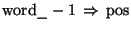
classification. For instance, beside having the rule
you should also have the rule
While this might seem as a strange condition, it is made necessary by the
fact that if all the rule templates are dependent on the current classification,
then the ``positive'' rules generated at the end will either have a score lower
than the best rule (otherwise they would have been the best rule) or will have a
non-useful form (e.g. word_-1 pos_0=NN  pos=NN).
Finally, the rules are output in the direct order of their good counts, such
that better rules get the final decision in deciding the classification of a
sample.
The fnTBL toolkit tries to keep the amount of memory used to a minimum. To do
this, it is set-up by default to use the following data types:
- For the feature values (e.g. words, POS, chunk tags, etc) - unsigned
int (32 bits on most compilers; 4294967296 max) - the corresponding type
is wordType;
- For the indices to feature templates (e.g. words, POS, chunk tags, etc) -
unsigned char (8 bits on most compilers; 256 max vals);
- For the feature positions (e.g. feature indices) - unsigned char (8
bits, 256 max);
- For feature differences (e.g. how many features before/after the current
one) - signed char (8 bits,
![$ \left[ -128,127\right] $](4_ Using The Toolkit.files/img73.png) , 256 max).
, 256 max).
The
user has the possibility of adjusting the sizes of these types, making the
approach usable when the data requires it, as follows:
- Changing the feature value representation size (e.g. your data vocabulary
size is greater than 64k) - edit the Makefile, and replace the definition
with (for instance)
and recompile the program. You may need to run ``make clean'' before
recompilation, to be sure that all the sources are remade properly. If you
have more than 4294967296 samples in the corpus (you really have that many?)
then you should set it to ``unsigned long long''.
- Changing the feature position size (e.g. you have more than 256 features
per example) - edit the compilation variable POSITION_TYPE to the next
available type; for instance from
to
4.8 Bug
Reports
The fnTBL toolkit is still in its infancy and it is possible that there are
still bugs in the code. We haven't observed any for a few months now, but the
toolkit was constructed by us, and it is possible that we never did something to
break it. If you manage to break it in any way (that includes the 2 executables
and the scripts that came with the toolkit), you are invited to report the bug
to the authors, either by e-mail at one of the following addresses:
or using one of the links from the main fnTBL toolkit web page:
When submitting a bug report, we are asking you to submit the following
information:
- A brief description of how the bug was obtained;
- The configuration files used when you obtained the bug;
- The training data file and/or the rule files that were used, if possible.
The data files will make the debugging process a lot easier; since we
can imagine that giving the authors access to your data files might make you
uncomfortable, we promise not to use the data in any other way than for
debugging the process and also to delete it as soon as the bug was fixed; we are
even willing to sign NDAs, if required.
Next: 5. Test Cases Up: Fast Transformation-Based Learning Toolkit Previous:
3. System Description Contents
Radu Florian 2001-09-12  ,
,  - in which case it represents the generation threshold;
 ,
,  ,
,  where
where  is the score
associated with the best rule selected;
is the score
associated with the best rule selected;