


Next: Acknowledgements Up: Fast Transformation-Based Learning Toolkit Previous:
4. Using The Toolkit Contents
Subsections
5. Test
Cases
5.1
Base Noun Phrase Chunking
We will start the example section with the task of Base NP chunking - where
the goal is to identify the basic, non-recursive, noun phrases in a sentence.
This task can be converted to a classification task, where each word is to be
assigned a class corresponding to its relative position in a noun phrase: inside
a noun phrase, beginning a noun phrase or outside a noun phrase. In Figure 5.1,
we show an actual sentence from the Wall Street Journal corpus, together with
its part-of-speech labeling and the chunk labels.
There are many ways to map from base-NP brackets to base NP chunks (as
described in[SV99]);
in this particular example we will use B for words that start a base NP, I for
words that are inside or end one and O for words that are outside any noun
phrase.
The samples in this task are 2 dimensional and are of the form
The POS associated with the word is in this case fixed, and is obtained
by tagging the data with your favorite tagger (in our case, the data is the one
provided by Ramshaw and Marcus, therefore the tagger is Brill's tagger).
Figure 5.2(a)
displays an example of parameter file for the baseNP task. The constraints file
(constraints.chunk.templ) can contain constraints of the following form:
- word - chunk constraints (of the form oak I B);
- pos - chunk constraints (of the form NN I B).
Table 5.1: Sample of lexical rule template
file
|
chunk_-1 chunk_0  chunk chunk
chunk_0 chunk_1 chunk
word_-1 word_0 chunk
word_0 word_1 chunk
chunk_-1 chunk_0 word_0
chunk
chunk_0 chunk_1 word_0
chunk
word_-1 word_0 chunk_0
chunk
word_0 word_1 chunk_0
chunk
word:[-3,-1] chunk
word:[1,3] chunk
chunk:[-3,-1] chunk
chunk:[1,3] chunk
|
¡¡
pos_0 chunk_0 chunk
pos_-1 pos_0 chunk
pos_0 pos_1 chunk
word_0 pos_0 pos_1
chunk
pos_-1 pos_0 chunk_-1 chunk_0
chunk
pos:[-3,-1] chunk
pos:[1,3] chunk
pos_-2 pos_-1 pos_0 chunk_0
chunk
pos_-1 pos_0 pos_1 chunk_0
chunk
pos_0 pos_1 pos_2 chunk_0
chunk
chunk_-2 chunk_-1 chunk_0
chunk
chunk_-1 chunk_0 chunk_1
chunk
chunk_0 chunk_1 chunk_2
chunk
|
|
|
|
|
An example of rule templates one could use are listed in Figure 5.1.
A much larger list, consisting of the templates that seemed useful to us, is
provided in the directory test-cases/baseNP of the main distribution.
Experimentation with different templates is usually needed for good results, so
feel free to adjust and create new rule templates as you see fit.
5.1.1
Creating the Training and Test Data
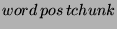
We start by assuming that you have the data in a 3 column format - a sequence
of samples
where word is the word, pos is the part-of-speech
associated with it (this can be the true POS or one assigned by a POS tagger)
and tchunk is the true chunk tag associated with the word
(I,O or B). The sentences are presumed to be separated by
one blank line.
The first step is to determine the most likely chunk tag for each sample;
basically one needs to compute either 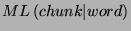 or
or 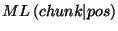 . We found that the second one
(most likely given the POS) to be more informative, since base noun phrases are
very dependent on the part of speech. The following sequence of commands will
assume that you want to create the lexicon based on pos; if the one on
word is desired, change the commands accordingly:
. We found that the second one
(most likely given the POS) to be more informative, since base noun phrases are
very dependent on the part of speech. The following sequence of commands will
assume that you want to create the lexicon based on pos; if the one on
word is desired, change the commands accordingly:
- Create the pos lexicon (a list of chunk tags associated with each
pos value):
mcreate_lexicon.prl -d '1=>2' myfile > pos-chunk.lexicon
- Add an additional field to the sample (corresponding to the ``current''
chunk tag) and assign the most likely value (based on pos) to it:5.1
perl -ape '$_={}''$F[0] $F[1] -- $F[2]\n{}'' ' myfile | \\
most_likely_tag.prl -p '1=>2' -t O,O -l pos-chunk.lexicon -- > myfile.init
The same processing must be performed on the test data as well.
Additionally, you might want to create constraints, which will enforce that
the rules not assign priorly unseen chunk tags to the samples. The
pos-chunk.lexicon file can be used as constraints on pos and
tchunk. If you want to create constraints also on words (for instance,
never assign to the the chunk O, or to the word '.' the chunk
I), you could run the command:
mcreate_lexicon.prl -d '0=>2' [-n <threshold>] myfile > word-chunk.lexicon
where threshold is the minimum count for a word to enter the constraints5.2. This will create a list of chunk tags for
each word with count above the threshold, where the tags are sorted in the order
of their cooccurrence count. Then you should create a constraint template, for
instance :
word tchunk word-chunk.lexicon
pos tchunk pos-chunk.lexicon
and update the field CONSTRAINTS_FILE in the parameter file to
point to the correct file.
The training can be performed using the command:
fnTBL-train myfile.init chunker.rls -F <param_file> [-threshold <threshold>]
The threshold you choose can have a big impact on both the training time and
the performance of the program. If you have small data, then a low threshold (0)
is useful, as learning all the possible transformations can help. If your data
is quite large, then using a threshold of 0 can make the program run for a long
time (as there are a lot of rules with a count of 1); a threshold of 1 or 2 can
prove more useful, as the rules that have a score of 1 can actually hurt
performance, especially if the training and test data are not very similar.
One useful property of TBL is that you can restart the training from where
you stopped the last time. The only thing needed is to apply the rules you
learned so far to the training data, and you can restart the training from the
moment you stopped. Also, if you learned all the rules that have a score of 1,
for instance, you can eliminate them from the rule list (as they can be easily
identified, because the score is present in those files), and retest the
performance of the system.
In conclusion, if you use the entire WSJ data to train the baseNP chunker,
use a threshold of 1 if your machine is not super fast, otherwise use a
threshold of 0, with the option of eliminating the rules with a score of 1 if
they hurt performance. If you train on the smaller WSJ data (sections 15-18),
then use a threshold of 0, as the training time is relatively short.
To test, you need to put the test data in the same 4 column mode file (using
the commands from Section 5.1.1)
and run the command:
fnTBL testfile.init -F <param_file>
If, in addition, you want to see which rules applied to which samples, add at
the end the flag -printRuleTrace. This will add after each sample the
character '|', followed by the indices associated with the rules that applied on
that particular sample; the first index is 0. You could use the script
number-rules.prl, provided in the distribution, to see the rules'
indices.
Finally, the README file present in the test-case/baseNP contains all the
command lines needed to run the chunker, and the chunker.wsj-small.rls and
chunker.wsj-large.rls files contain the rules as learned by the program on the
sections 15-19, respectively 02-21, of the WSJ corpus.
5.2 POS
Tagging
The TBL solution to the POS tagging problem is broken down into 2 problems:
- First, the unknown words' POS are guesses, by making use of morphology -
the prefixes, suffixes, infixes (of length 1) of the words, etc. - we will
call this step lexical POS tagging, or simple lexical tagging;
- Second, starting from the output of the previous step, the words are
examined in context to determine the best transformations - we will call this
step the contextual POS tagging, or simple contextual tagging.
Though
it would be possible for the two tasks to be combined into just one big task,
there are good reasons for keeping them separate:
- The lexical tagging task examines the words in isolation, therefore the
samples are independent, and the toolkit can solve this problem more
efficiently because of the independence property;
- If there are no rule types that use features from both type of rules, it
is not clear whether the joint estimation will produce different results from
the one obtained by sequential estimation; combining the two types of rules
(such as
 ), usually results in
a very large number of rules, large enough so to make the application require
too much memory to be practical;
), usually results in
a very large number of rules, large enough so to make the application require
too much memory to be practical;
- Since the lexical tagging refers only to unknown words, a much smaller
training corpus can be selected (only the unknown words), which results in
significantly shorter training time;
- The lexical tagging step uses data structures that are not necessary for
the other step (e.g. lexical tries); storing them for the second step is
wasting significant amounts of memory;
- Preliminary experiments showed no improvement from a joint estimation;
- The two steps might have different parameters (termination threshold,
etc).
The next two sections will describe the type of rules that can
be used for each process, and Section 5.2.3
will describe 2 scripts that automatize most of the POS tagging process, so, for
people in a hurry, that is the section to read.
5.2.1
Lexical POS Tagging - Guessing the Unknown Words
The approach taken by fnTBL follows the guidelines set by Brill: the training
data is split into 2 separate parts. Lexical priors (well, only the most likely
sense) is learned using the first part, and then the second part is used to
train a TBL system for the unknown words.
We propose that the initial POS assignment on the second part of the corpus
be done according to:
where  is a word,
  is the POS tag corresponding to the proper noun,
  is the POS tag
corresponding to the noun and
is the POS tag
corresponding to the noun and  is the number of times that the
word appeared in the first part of the
training set. Let us observe that if
is the number of times that the
word appeared in the first part of the
training set. Let us observe that if  then the assignment is
done the same way Brill is doing it.
then the assignment is
done the same way Brill is doing it.
The rule types that can be used for lexical tagging are:
- The prefix/suffix of the word is a specified sequence of characters:
For instance the rule
fires on every word that starts with the letters pre and the
rule
fires only on words that end with the letters able (unable,
enjoyable).
- Adding a specified prefix/suffix results in a word (i.e. is in a specified
large vocabulary)
For instance
will fires only on words like like, converse, etc (words
to which by adding the suffix ly we obtain another word -
likely, conversely);
- Subtracting a specified prefix/suffix results in a word:
For instance the rule
will fire on words like unspecified, undo.
- The word in question contains a specified character (such as -):
For instance the rule
will fire on each word that has the dot char '.' in it, transforming it
into a cardinal.
- The word in question appears in to the left/right of a specified word in a
long list of bigrams (e.g. appears after the somewhere in a list of
bigrams makes it likely to be a noun):
For instance the rule
will fire on all words that appear after the in a list of
bigrams.
In Table 5.2
a sample of how the rule template file should look like is presented - it is the
actual rule file present in the distribution5.3:
Table 5.2: Sample of lexical rule template
file
|
word => pos
# This are the rules using 5 characters
# Suffix/prefix identity
rules
pos word::5 =>
pos
pos word::5 =>
pos
# Suffix addition only
at this level
pos word::++5
=> pos
# Suffix/prefix
subtraction rules
pos
word::-5 => pos
pos
word::5- => pos
# Rules
at level 4, etc.
pos word::4
=> pos
pos word::4 =>
pos
pos word::4++ =>
pos
pos word::++4 =>
pos
pos word::-4 =>
pos
pos word::4- =>
pos
pos word::3 =>
pos
pos word::3 =>
pos
pos word::++3 =>
pos
pos word::3++ =>
pos
pos word::3- =>
pos
pos word::-3 =>
pos
pos word::2 =>
pos
pos word::2 =>
pos
pos word::-2 =>
pos
pos word::2- =>
pos
pos word::++2 =>
pos
pos word::2++ =>
pos
pos word::1 =>
pos
pos word::1 =>
pos
pos word::++1 =>
pos
pos word::1++ =>
pos
pos word::-1 =>
pos
pos word::1- =>
pos
pos word::1<>
=> pos
pos word1 =>
pos
pos word-1 =>
pos
|
# The
same rules as the preceding ones,
# but without conditioning on the POS
word::5 => pos
word::5 => pos
word::-5 => pos
word::5- => pos
word::4 => pos
word::4 => pos
word::4++ => pos
word::++4 => pos
word::-4 => pos
word::4- => pos
word::3 => pos
word::3 => pos
word::++3 => pos
word::3++ => pos
word::3- => pos
word::-3 => pos
word::2 => pos
word::2 => pos
word::-2 => pos
word::2- => pos
word::++2 => pos
word::2++ => pos
word::1 => pos
word::1 => pos
word::1<> => pos
word::++1 => pos
word::1++ => pos
word::-1 => pos
word::1- => pos
# Bigram cooccurrence
predicates:
# Test on the
previous word
word-1 =>
pos
# Test on the next
word
word11 =>
pos
|
|
|
|
|
There are several steps which need to be taken when performing the lexical
training:
- The training data (already in the column format) has to be split into 2
parts (equal or not);
- From the first part, most likely information needs to be extracted;
- Using the most likely POS information, assign the initial tag to the
unknown words from the second part; a word from the second part is considered
unknown if it didn't appear in the first part;
- Generate the unigram list from the first part, or from some large corpus;
- Generate a bigram list from the current corpus, a large corpus or both;
- Create the rule template file and the parameter file;
- Run the fnTBL-train program.
5.2.2
Contextual POS Tagging
After the initial stage, when POS is guessed for unknown words, a second
learning process is to be applied, one that learns to correct POS in context. To
do this, the learner can use a combination of one of the following basic
predicate types5.4:
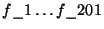
- The identity of one of the words in context:
where
 can be, in principle, a number
ranging from
can be, in principle, a number
ranging from  to
to  (we assume that the name of the ``word'' feature is
  ; otherwise, replace with the appropriate name); for
instance, the rule
will apply only on positions where 2 words back is the word
; otherwise, replace with the appropriate name); for
instance, the rule
will apply only on positions where 2 words back is the word  .
.
- The identity of one of the POS in context:
where is the same as before (replace
 with the name of you POS
feature, as defined in the file pointed by the parameter FILE_TEMPLATE, if
different than );
with the name of you POS
feature, as defined in the file pointed by the parameter FILE_TEMPLATE, if
different than );
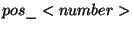
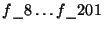
- The identity of one of the previous/next words:
where can be a integer number in
![$ \left[ -128,127\right] $](5_ Test Cases.files/img73.png) ; for example, the rule
will change the POS of a word from
; for example, the rule
will change the POS of a word from  to if one of the previous 2 words
is
to if one of the previous 2 words
is  ;
;
- The identity of one of the previous/next POS tags:
where is the same as before; e.g.
An example of template file can be found in Table 5.2.2
|
pos_0 word_0 word_1 word_2 => pos
pos_0 word_-1 word_0 word_1 => pos
pos_0 word_0 word_-1 => pos
pos_0 word_0 word_1 => pos
pos_0
word_0 word_2 => pos
pos_0 word_0 word_-2
=> pos
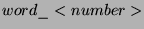
pos_0 word:[1,2] => pos
pos_0 word:[-2,-1] => pos
pos_0 word:[1,3] => pos
pos_0
word:[-3,-1] => pos
pos_0 word_0 pos_2 =>
pos
pos_0 word_0 pos_-2 => pos
pos_0 word_0 pos_1 => pos
pos_0 word_0 pos_-1 => pos
pos_0
word_0 => pos
pos_0 word_-2 => pos
pos_0 word_2 => pos
pos_0 word_1 => pos
pos_0 word_-1
=> pos
pos_0 pos_-1 pos_1 => pos
|
pos_0 pos_1 pos_2 => pos
pos_0 pos_-1 pos_-2 => pos
pos_0
pos_1 => pos
pos_0 pos_-1 => pos
pos_0 pos_-2 => pos
pos_0 pos_2 => pos
pos_0 pos:[1,3]
=> pos
pos_0 pos:[1,2] => pos
pos_0 pos:[-3,-1] => pos
pos_0 pos:[-2,-1] => pos
pos_0 pos_1
word_0 word_1 => pos
pos_0 pos_1 word_0
word_-1 => pos
pos_-1 pos_0 word_-1 word_0
=> pos
pos_-1 pos_0 word_0 word_1 => pos
pos_-2 pos_-1 pos_0 => pos
pos_-2 pos_-1 word_0 => pos
pos_1
word_0 word_1 => pos
pos_1 word_0 word_-1
=> pos
pos_0 pos_1 pos_2 => pos
pos_0 pos_1 pos_2 word_1 =>
pos
|
|
|
|
Example of contextual rule templates
.
The steps that need to be done to run the contextual tagging are:
- Compute, from the training data, the most likely POS tag associated with
the words. This is probably well enough computed at the previous step, but if
you want to compute it again, using the entire data, now is the time5.5.
- Use the lexical rules obtained at the previous step to guess the POS of
all the unknown words in the training data - this is done by applying
fnTBL to the training data, with appropriate flags:
- Run the learning command
where the options are presented in Section 4.2.
Some observations:
- As discussed earlier, TBL suffers from the lack of output probability
estimation, and the fix is to enforce a class output limited to the choices
seen in training data. While this is appropriate for high frequency words, it
might not be for low frequency ones. Therefore, it might be wise to create the
most likely file using a threshold, such that words that are below the
frequency threshold are not limited to be assigned a POS associated with them
in the training data.
- Depending on the number of predicate templates and/or how long the context
in the predicate templates is, the program might need relatively large amounts
of memory5.6. This behavior is due in part to the STL
(Standard Template Library) and in part to the fact that all the possible
rules that correct at least one error are generated at the start of the
program. An improvement of the program would be to restrict the initial
generation of the rules to the ones that apply at least a certain number of
times, since only those ones can be chosen at the starting phase. This
modification will probably be present in the version 2.0 of the toolkit.
5.2.3 TBL POS Tagging Without Headaches
Fortunately, there are 2 scripts provided, pos-train.prl and
pos-apply.prl, which do most of these tasks, with little
intervention.
For the purpose of training a TBL POS tagger, one can use the script
pos-train.prl. It should be called as:
pos-train.prl <parameters>
<train_file>
where the options are:
- Mandatory parameters:
- -F <lexical_param_file>,<context_param_file> -
defines the lexical parameter file and the contextual parameter file. As a
starting point for these files, one could use the provided
tbl.lexical.params and tbl.context.params.
- <train_file> is the training file, 2 columns per line
(first the word, second the true POS); sentences should be separated by an
empty line.
- Optional parameters:
|
-B <bigram_file> |
defines the file containing the large quantity of bigrams; if
undefined, the bigrams are extracted from the training file; |
|
-f <cutoff> |
defines the cutoff to be used for contextual features with the
contextual training; |
|
-o <outfile1>,<outfile2> |
defines the names the two split files will have; by default they
are <train_file>.part1,
<train_file>.part2; |
|
-r <ratio> |
defines the ratio of the split between the first file and second
file (0.3 would split it 0.3/0.7, with 0.3 being the one from which the
counts are extracted); |
|
-t <NC>,<NP> |
defines the POS symbols for the common noun and proper noun; by
default the values are NN and NNP, but they need to be specified for other
languages; |
|
-R
<lexrulefile>,<contextrulefile>
|
specifies the names of the 2 rule files to be output: the lexical
rule file and the contextual rule file - by default lexical.rls and
context.rls;
|
|
-T <thresh1>,<tresh2> |
defines the learning thresholds for the lexical/contextual
tagging; |
|
-u <unigram_file> |
defines the file containing the large vocabulary; if not present,
the unigrams are extracted from the training file; |
|
-v |
turns on the verbose output - useful for debugging and/or see what
sequence of commands the program executes; |
Some observations about the training procedure:
- The cutoff we regularly used is 10, but your mileage may vary. Experiment
with different values, as it may improve the performance of the classifier;
- The split ratio as proposed by Brill is 0.5 (50%). We found it better to
use something like 0.35-0.4, as it more words will be ``unseen'', and
therefore the program will ``generalize'' more;
- The default threshold is 3: the learner will stop if it obtains a rule
with a score less than 3. The lower the threshold, the longer the training
time; while this algorithm speeds up considerably as the best rule has lower
score, there are a (exponentially) larger number of rules with lower score (as
suggested by Zipf's law). A threshold of 0 will force the algorithm to learn
to completion (until no more rules are possible); it is debatable if rules
that apply once during training have good generalization properties5.7. Experimentation is needed to determine if
those rules help or hurt - they usually help in cases where the training data
is scarce, and don't help where there is a lot of training data;
- If the POS is done in a language where more types of common noun are
possible, select the one that is most common to be assigned. The proper noun
will be assigned to the data if the word starts with a capital letter - assign
the same type of common noun if some other nouns start with capital letters
(e.g. like in German);
- It is useful to filter the bigram file such that at least one of the words
is a frequent word, because infrequent words will probably not help in
figuring the POS of unknown words (because they are infrequent).
The application of a rule list to a corpus consists of 2 phases also: first,
we apply the lexical rules, to guess the POS for unknown words, and then we
apply the contextual rules. One can call the fnTBL program directly, or call the
tbl-apply.prl script. This script is called as:
tbl-apply.prl <options>
<test-file>
where the options are:
|
-F <lexparam>,<contextparam>
|
defines the 2 parameter files; as a start, one could use the
tbl.lexical.params and tbl.context.pos.params provided with the
distribution;
|
|
-t <NC>,<NP> |
defines the POS symbols for the common noun and proper noun; by
default the values are NN and NNP, but they need to be specified for other
languages;
|
|
-R
<lexrulefile>,<contextrulefile>
|
specifies the 2 rule files: the lexical rule file and the
contextual rule file;
|
|
<test_file>
|
the text to be tagged; can be in 1 or 2 column
format.
|
|
-m <most_likely_tag_file>
|
defines which file should be used to initialize the test data - it
should the "largest" data available.
|
|
-o <output_file>
|
defines the name of the output file; if not present the output will
be in a file called <test_file>.res;
|
|
-v
|
turns on verbose output - useful for debugging and to see what the
script does.
|
Some observations about the process of applying a POS rule list:
- The test file can be in either 1 column format (1 word per line) or 2
column format (word and truth, if testing is desired); sentences should be
broken by an empty line;
- The same observations about the most frequent common noun and the most
common proper noun made for the script pos-train.prl apply here as
well;
- The most likely file that is applied to the test data should be extracted
from the entire training data; the less unknown words, the more accurate the
process;
- If you want to see what the script is doing, turn on the verbose flag.
5.3 Word Sense
Disambiguation
Word sense disambiguation is the task of assigning predefined senses to
particular words in context. It can be cast as either a lexical choice task
(where the goal is to determine the sense for one particular word in a given
context) or a all-words task (assign senses to all nouns, verbs, adjectives and
adverbs in a sentence) - the task we are presenting here is the lexical choice
task. In this task, the samples are independent, as the classification of one
instance of a word can be considered independent from the other
classifications5.8.
The samples in this task consist of a number of sentences around or before
the word of interest; a number of such samples is presented for each word and
are (supposed to be) balanced on the senses. As preprocessing we applied the
following steps:
- The text was tokenized and end-of-sentence delimiters were inserted;
- Samples were POS tagged, lemmatized and tagged with sentence chunks (using
the fnTBL, of course
 ).
).
- Syntactic information associated with the selected words was extracted
(e.g. the verb to which the noun in question is object to, etc).
For
more information on the processing, see [YCF$^+$01].
The features that the TBL system has access to the following feature type:
- words in a 3 positions window (word-3left
 word-3right);
- part-of-speech information in a 3-word window (pos-3left pos-3right);
- lemmas in a 3-word window (lemma-3left
lemma-3right);
- a set of 7 words around the word in question (word-in-a-3-word-window);
- a set of 7 lemmas around the word in question (lemma-in-a-3-word-window);
- a set of 100 words (not stopwords) around the word to be disambiguated
(word-in-a-100-word-window);
- a set of 100 lemmas (not stopwords also) around the word to be
disambiguated (lemma-in-a-100-word-window);
- the syntactic features (that also depend on the POS of the word) described
earlier.
The difference between the labeled words (e.g. word-3left)
and the unlabeled ones (word-in-a-3-word-window) is that a rule depending on the
predicate word-3left=manufacturing will fire if the manufacturing
appears exactly 3 words back from the word position, while the predicate
word-in-a-3-word-window=manufacturing will be true if the word
manufacturing appears anywhere in a 3 word window around the desired
word.
One way to create this data is the following (we assume that we want 2
window-sizes for the set features 7 and 100):
and repeat the process for lemmas as well. Then
add the following line to the parameter file:
this will prevent the toolkit from considering predicates of the form
word-in-a-3-word-window=-, which are not really useful and will just
increase the computation time5.10.
Since the input to the task can vary considerably, we did not provide any
tools to prepare the data; it should not be very hard for the reader to create
the data files, as they require just normal perl processing. In the
test-cases/wsd directory we provided a parameter file, together with the
file.templ and rule.templ files corresponding to the 3 and 100 windows described
in this Section. Also provided are training and test data for the verb
strike, as extracted from the Senseval2 data.
Another interesting observation is that, in the Senseval data, some samples
had multiple classifications. fnTBL toolkit can handle this case if one
separates the values with a special character, which should be defined in the
parameter file. For instance,
will defined the character separator to be '|' -- values such as
strike%2:35:03::|strike_a_chord%2:31:00::5.11 will be interpreted correctly as one of the
senses and rules will be generated such that they correct at least one of the
senses; the concatenation is not treated as a new truth. If the parameter file
does not contain such a definition, then the values such as the one described
above will be considered to be classifications.
The training is done in the usual way, once the files are created. The
command to be run is
fnTBL-train myfile.init wsd.rls -F <param_file> [-threshold <n1>]
~~[-allPositiveRules <n2> [-minPositiveScore <n3>]]
Some observations:
- For this task, using a threshold of 0 seems beneficial, as the data is
sparse.
- This is a classic example where the original TBL algorithm performs
poorly, partly because it does not allow for redundancy. If one uses the flag
-allPositiveRules, then one will allow the algorithm to select those
rules that, at the end, have a ``good'' application count5.12 over the specified threshold and do not
have any bad application - see Section 4.5
for further details.
- In case the argument of the -allPositiveRules flag either contains
a '%' sign or is negative, one can use the -minPositiveScore flag to
enforce the minimum count over which rules are output.
When TBL is
allowed to consider the redundant rules its performance is very similar to the
one of a decision list-based algorithm, similar to the one described in [Yar95],
that has access to the same features as the TBL algorithm.
To test the system, one runs the command:
fnTBL mytest.init wsd.rls -F <param.file> [-printRuleTrace] [-o <outfile>]
The directory test-cases/wsd contains a README file which has all the
commands needed to run the fnTBL system on the verb strike data provided.
Next: Acknowledgements Up: Fast Transformation-Based Learning Toolkit Previous:
4. Using The Toolkit Contents
Radu Florian 2001-09-12 













![$\displaystyle word:[<number>,<number>]$](5_ Test Cases.files/img162.png)
![$\displaystyle pos\_0=VBP\, \, word:\left[ -2,-1\right] =a\Rightarrow pos=NN$](5_ Test Cases.files/img163.png)
![$\displaystyle pos:\left[ <number>,<number>\right] $](5_ Test Cases.files/img166.png)
![$\displaystyle pos\_0=NN\, \, pos:\left[ -2,-1\right] =MD\Rightarrow pos=VB$](5_ Test Cases.files/img167.png)


 ;
;
 , adding
the character '-' if necessary5.9.
, adding
the character '-' if necessary5.9.
 , adding the character '-' if
necessary.
, adding the character '-' if
necessary. 

![\begin{figure}{\centering\begin{tabular}{cccccccccccc}
{[}&
A.P.&
Green&
{]}&
cu...
...{tabular}\par }
\par Base NP transformation to a classification task\end{figure}](5_ Test Cases.files/img129.png)
![\begin{figure}\subfigure[Parameter file for baseNP chunking]
{\\
\parbox{10cm}{...
...{ word pos chunk => tchunk }
\par Sample files for base NP chunking
\end{figure}](5_ Test Cases.files/img131.png)